
Hello guys,
i´ve got a question..
I have bought an "MSI Geforce 7300 LE"
http://www.pramool.com/auctpic9/added/5 ... 527703.jpg" onclick="window.open(this.href);return false;
Can i use this graphic card with an DVI to VGA adapter and the Elsa Revelator Glasses?!
Ore is the adapter an problem?!
MFG
BigMongostyler =)
3d Elsa Revelator using on MSI Geforce 7300 LE
-
bigmongostyler

- One Eyed Hopeful
- Posts: 9
- Joined: Sat Dec 22, 2007 3:38 am

-
cybereality

- 3D Angel Eyes (Moderator)
- Posts: 11407
- Joined: Sat Apr 12, 2008 8:18 pm
Re: 3d Elsa Revelator using on MSI Geforce 7300 LE
Yeah, that should be no problem. Just make sure you're on WindowsXP and use old drivers (93.31 is good I believe).
-
bigmongostyler
- One Eyed Hopeful
- Posts: 9
- Joined: Sat Dec 22, 2007 3:38 am
Re: 3d Elsa Revelator using on MSI Geforce 7300 LE
okay that's great,
because i have anywhere read that if you you use an adapter it wouldnt work for stereo 3d,
with elsa glasses..
The graphic card is currently on the way to me,
but I have windowsxp on it.
And these "93.31" driver combi i have to test it.
Thanks for this info
because i have anywhere read that if you you use an adapter it wouldnt work for stereo 3d,
with elsa glasses..
The graphic card is currently on the way to me,
but I have windowsxp on it.
And these "93.31" driver combi i have to test it.
Thanks for this info

-
bigmongostyler
- One Eyed Hopeful
- Posts: 9
- Joined: Sat Dec 22, 2007 3:38 am
Re: 3d Elsa Revelator using on MSI Geforce 7300 LE
Hey,
i got a problem...
I have got my "MSI Geforce 7300 LE" on ebay.
The card got only "DVI" output,
i use an "DVI" to "VGA" adapter..
I have testet the driver combi
-ForceWare 93.71 (x86) WHQL
-ForceWare 91.31 Stereo Driver
and
-162.50_quadro_winxp2k_english_whql
-StereoE16250-[Guru3D.com]
I go to "Stereo" then "Enabled,
then comes the "Medical Test image"
in correkt 3d stereo.
If i put my "3D Elsa Revelator IR version" on,
nothing happened...
Baterry is okay, it´s new "CR2032 - 3 volt"
I have set
DDC VGA glasses (I0 Display) ore
Direkt 3pin DIN VESA Connect - Stereo Type
Where is the probelm..?!
My System:
System: WinXP 32bit
Processor: Amd Athlon 64 x2 Dual core 2,6 ghz x2
Motherboard: Abit Fatality SLI 32x
Graphic: Gforce 7300 LE
- http://www.pramool.com/auctpic9/added/5 ... 527703.jpg" onclick="window.open(this.href);return false;
RAM: 2048 mb ddr2 ram
Monitor: Philips 19" CRT Monitor who Supported 120hz@ 800x600 100hz@ 1024x768
i got a problem...
I have got my "MSI Geforce 7300 LE" on ebay.
The card got only "DVI" output,
i use an "DVI" to "VGA" adapter..
I have testet the driver combi
-ForceWare 93.71 (x86) WHQL
-ForceWare 91.31 Stereo Driver
and
-162.50_quadro_winxp2k_english_whql
-StereoE16250-[Guru3D.com]
I go to "Stereo" then "Enabled,
then comes the "Medical Test image"
in correkt 3d stereo.
If i put my "3D Elsa Revelator IR version" on,
nothing happened...
Baterry is okay, it´s new "CR2032 - 3 volt"
I have set
DDC VGA glasses (I0 Display) ore
Direkt 3pin DIN VESA Connect - Stereo Type
Where is the probelm..?!
My System:
System: WinXP 32bit
Processor: Amd Athlon 64 x2 Dual core 2,6 ghz x2
Motherboard: Abit Fatality SLI 32x
Graphic: Gforce 7300 LE
- http://www.pramool.com/auctpic9/added/5 ... 527703.jpg" onclick="window.open(this.href);return false;
RAM: 2048 mb ddr2 ram
Monitor: Philips 19" CRT Monitor who Supported 120hz@ 800x600 100hz@ 1024x768
-
Likay

- Petrif-Eyed
- Posts: 2913
- Joined: Sat Apr 07, 2007 4:34 pm
- Location: Sweden
Re: 3d Elsa Revelator using on MSI Geforce 7300 LE
Afaik you can't mix older stereodrivers too much. When running 91.31 stereo you need 91.31 forceware as well. Sometimes it works anyway but it's safer matching the versions. The 162.50 can be run with newer driver what i know of. Since a while ago i ran 169.21fw+162.50 successfully.
Ps: The older stereodrivers (91.31 and up to around ~97.44) do NOT support mutliprocessor cpu's. Use nhancer or a dual boot with modified boot.ini to fix this!
Ps: The older stereodrivers (91.31 and up to around ~97.44) do NOT support mutliprocessor cpu's. Use nhancer or a dual boot with modified boot.ini to fix this!
Mb: Asus P5W DH Deluxe
Cpu: C2D E6600
Gb: Nvidia 7900GT + 8800GTX
3D:100" passive projector polarized setup + 22" IZ3D

Cpu: C2D E6600
Gb: Nvidia 7900GT + 8800GTX
3D:100" passive projector polarized setup + 22" IZ3D
-
bigmongostyler
- One Eyed Hopeful
- Posts: 9
- Joined: Sat Dec 22, 2007 3:38 am
Re: 3d Elsa Revelator using on MSI Geforce 7300 LE
i have do this what do you say me,
run single core over msconfig..
And use the driver combination
-ForceWare 91.31 Windows 2000|XP WHQL
-ForceWare 91.31 Stereo Driver
and many other combinations..
But no one would to start my 3d elsa glasses,
the glasses dooo nothing ..
Have i to buy new glasses ore what i can do...
I was so happy and now nothing works again
run single core over msconfig..
And use the driver combination
-ForceWare 91.31 Windows 2000|XP WHQL
-ForceWare 91.31 Stereo Driver
and many other combinations..
But no one would to start my 3d elsa glasses,
the glasses dooo nothing ..
Have i to buy new glasses ore what i can do...
I was so happy and now nothing works again
-
Dom
- Diamond Eyed Freakazoid!
- Posts: 824
- Joined: Sun Oct 19, 2008 12:30 pm
- Contact:
Re: 3d Elsa Revelator using on MSI Geforce 7300 LE
Hi when my glasses would not turn on I used the ed.exe activator program from edimensional.com . The ddc option in nvidia control panel should turn your glasses on when in full screen only like in a game or stereoplayer. The ed.exe activator lets you enable the glasses on and off in any part of windows. To see the 3d effect in a game turn on ed activator and then push ctrl-t to turn on nvidia driver and should work in sync with your monitor. One thing to note is if your eyes are switched just press and holder the covergence button ctrl f5 and or ctrl f6 a long time until either way is for your right and left eyes corrected view.
http://www.cns-nynolyt.com/files/doms-systemspecs.html My System specs In HTML
Cyberia on Youtube
__________________________________________________________________________________________
Cyberia on Youtube
__________________________________________________________________________________________
-
cybereality
- 3D Angel Eyes (Moderator)
- Posts: 11407
- Joined: Sat Apr 12, 2008 8:18 pm
Re: 3d Elsa Revelator using on MSI Geforce 7300 LE
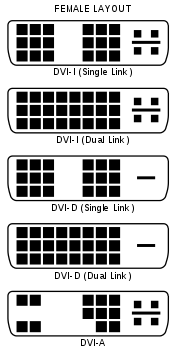
It might be the converter or cable you are using. You need one that preserves the analog signal, so DVI-I is the best bet. Compare the image below:
-
bigmongostyler
- One Eyed Hopeful
- Posts: 9
- Joined: Sat Dec 22, 2007 3:38 am
Re: 3d Elsa Revelator using on MSI Geforce 7300 LE
I LOVE YOU "cybereality"
my problem is cleared the glasses run perfektly !
juhuuuuuuuuuu yehaaaaa
im now on 3d stereo I LOVE IT ^xD
i usw now an "DVI-I DUAL LINK" adapter before i got an,
"DVI-A" adapter.
And i changed the monitor cable from new to old,
and its run! great thanks thanks thanks !
my problem is cleared the glasses run perfektly !
juhuuuuuuuuuu yehaaaaa
im now on 3d stereo I LOVE IT ^xD
i usw now an "DVI-I DUAL LINK" adapter before i got an,
"DVI-A" adapter.
And i changed the monitor cable from new to old,
and its run!
great thanks thanks thanks ! -
cybereality
- 3D Angel Eyes (Moderator)
- Posts: 11407
- Joined: Sat Apr 12, 2008 8:18 pm
Re: 3d Elsa Revelator using on MSI Geforce 7300 LE
Glad I could be of help.